


Pam App
4.8103.00 Reviews
App Specs
- Version
- 2.2.2
- Updated On
- License
- Free
- Downloads
- 1,000,000+
- Developer
- Pamela Rf
- Categories
- Food & Drink
- Platform
- Android
Screenshots

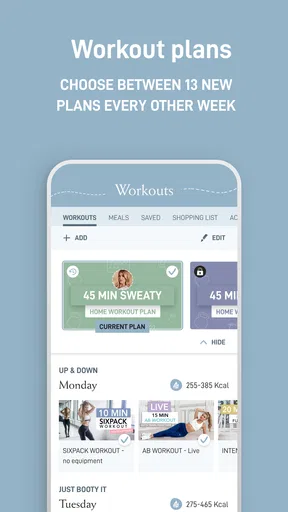
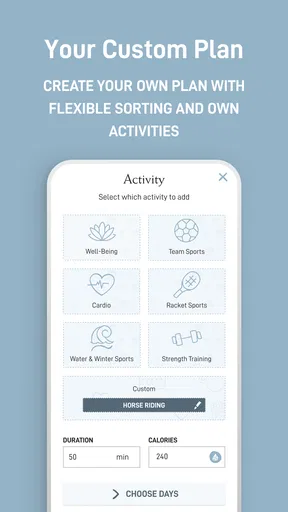
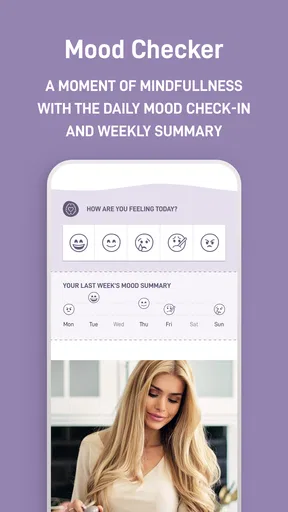
 Analysis by AppCompare
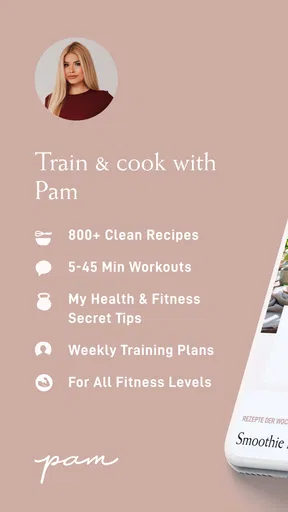
I tend to stick with a health routine longer when the planning is simple enough to fit around an ordinary week. Pam App brings recipes, workouts, shopping lists and personal planners together, which makes it appealing if you want fewer scattered notes and more structure in one place. It is a free food-and-drink app from Pamela Rf, though some purchases inside the app cost extra. I see its main value not as a promise of instant transformation, but as a way to make the next meal or workout easier to decide on.
A practical starting point for meals and movement
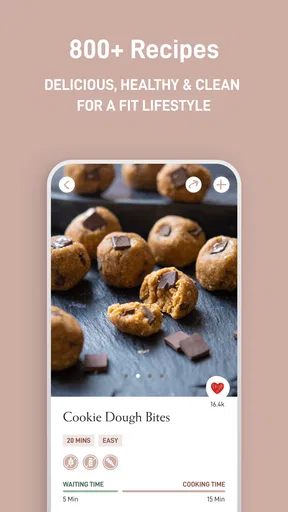
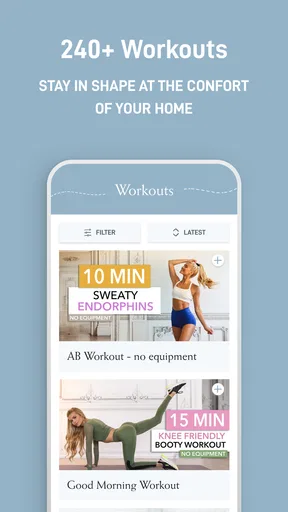
The easiest way to approach the app is to begin with one need rather than trying to overhaul your whole routine. If weekday meals are the part that tends to unravel, start by browsing recipes and using a shopping list to turn a few choices into a shop. If getting exercise into the week is the bigger hurdle, look at the workout options and use a planner to give those sessions a place in your schedule. That small starting point makes the collection of tools feel more manageable.
In a realistic week, I might check a recipe before heading to the grocery store, add the ingredients I need to a list, and then decide which days are suitable for workouts. The useful connection is the handoff between deciding and doing: a meal idea becomes something I can shop for, while a general intention to move becomes a planned activity. I would still expect to make choices myself. The app can help organize a routine, but it cannot know what is already in my kitchen or how much energy I will have after work.
That distinction matters if you are used to fitness apps focused solely on workouts or recipe collections that stop at inspiration. Pam App’s broader mix makes it a better fit for someone who wants meals and exercise to support the same weekly rhythm. If you prefer a specialized tool with deep controls for just one area, a dedicated recipe manager or workout tracker may suit you better.
Build a repeatable weekly rhythm
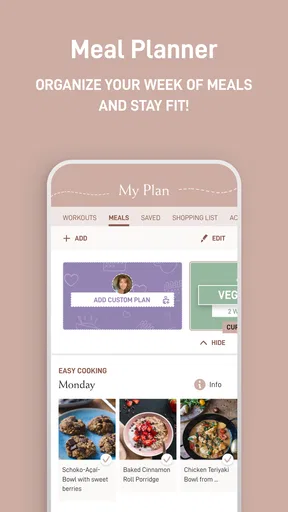
I would use the planner as a light framework, not a strict timetable. For example, choose a few meals that seem realistic, note the shopping needed, and reserve workout slots around existing commitments. Leave open space too. A plan that assumes every day will go perfectly can become frustrating as soon as a meeting runs late or plans change.
A helpful habit is to make the next decision before the moment arrives. Picking a recipe when you are already hungry can lead to hurried choices; checking options earlier gives you time to shop and prepare. The same goes for exercise: deciding which day works is often more useful than waiting for motivation to appear. This is where the app’s combination of planning tools can earn its place in a routine without demanding that you track every detail of your life.
There is also a trade-off in keeping everything together. A combined app can reduce the mental effort of jumping among separate lists and planners, but the best result depends on returning to it consistently. If you only open it when you are already organized, it will have less chance to help with the moments when planning is difficult. I would start with one repeatable task, then add another only when the first feels natural.
Worth Reading Before You Choose

EA SPORTS FC Mobile 26 Is a Bigger Football Game, but It Takes Time

Flipboard Shows What News Apps Must Do Beyond the Feed

Switching to Android Auto Means Rethinking Your Driving Routine

Google Calendar Makes a Crowded Week Easier to Manage

Ludo King Makes the Most of the Minutes Between Plans

Baby Panda World Brings Quick Play to Modern Phones, but Its Game Library Feels Busy
Who is likely to enjoy it
Pam App is most promising for people who want approachable support with food and workouts rather than a highly technical training dashboard. It can suit someone building a more regular routine, someone who likes to plan meals before shopping, or someone who wants personal planning tools close at hand. Its all-in-one approach may be especially useful if your current system is a mix of saved recipes, scattered reminders and a workout app you forget to check.
It is less suitable if you want a dedicated nutrition log, detailed performance analytics, or a highly customized meal database. Those are different jobs, and a specialist app may provide more depth for them. Likewise, if you do not want to plan meals or workouts at all, having several planning tools in one place may feel like unnecessary structure rather than a benefit. I would choose it for practical organization, not assume it replaces professional nutrition or fitness guidance.
The audience rating is strong, with a 4.8 average from around 11,000 ratings, and the app has passed one million installs. Those figures suggest plenty of people have found it worth trying, but they do not tell me whether its particular approach will match your habits. I would treat the free download as a chance to see whether the recipes, workouts and planning style suit you, while keeping in mind that optional in-app purchases range from $2.99 to $29.99 per item.
Small choices that make planning easier
One useful way to avoid overplanning is to pick meals with ingredients that can serve more than one purpose during the week. When using any recipe-and-shopping workflow, I find it easier to shop when the list reflects a few compatible meals instead of a different set of ingredients every night. This is a planning tactic rather than a special app feature, but it helps make the app’s recipe and list tools more practical in everyday life.
Another sensible pattern is to separate decisions from commitments. You can browse ideas when you have a quiet moment, then use your planner to decide what actually fits the coming days. That avoids treating every appealing recipe or workout as something you must complete. I would also leave room for a backup meal and a missed workout; a flexible plan is easier to resume than one that makes a single change feel like failure.
Before relying on a planner as your only reminder system, spend a few days checking how you naturally use it. If you tend to plan on Sunday but forget to look again midweek, build a brief review into a habit you already have, such as checking your shopping list before leaving home. The best workflow is the one you will repeat, not the one with the most entries.
What to check before settling in
Because the app includes both free access and in-app purchases, I would look at what is available to me before building a routine around any paid material. There is no need to assume that every recipe or workout requires a purchase, but it is sensible to check the details shown in the app and decide whether an optional item is worthwhile. That also helps avoid confusing the free download with an entirely paid-free experience.
The app is rated for Everyone and works on Android devices running version 8.0 or later. Its current version is 2.2.2, and it was released on January 16, 2021. Those basics help answer whether an older device may be compatible and give a sense of the product’s history; they do not determine whether its planning style will click for you. I would check that the app runs smoothly on your own device before moving all your routine notes into it.
For privacy-minded users, the sensible approach is to review the permissions and privacy information presented during setup rather than granting access automatically. The app’s focus is meal and workout planning, so I would keep personal details limited to what is needed for the way I choose to use it. That is a general good habit with any lifestyle app, especially when you are testing whether you will keep using it.
Making Pam App work for your routine
When I look at a lifestyle app, I care less about how many tools it gathers than whether those tools make an ordinary day easier. Here, the combination of recipes, workouts, shopping lists and planners offers a clear path from intention to action. I would use it to reduce the small decisions that pile up around meals and exercise, while keeping expectations realistic: it can organize choices, but consistency still comes from the person using it.
Where it fits among alternatives
Compared with using a recipe app, a separate workout service and a notes app, Pam App has the advantage of bringing several parts of a routine together. That can be a real convenience if you often lose track of plans across different places. A specialist alternative remains preferable when you need a specific capability in depth, such as careful nutrition tracking or detailed workout progression. The choice is less about which kind of app is universally better and more about whether you value breadth or specialization.
I would not replace a grocery store’s own list or a calendar that already works perfectly for you just for the sake of consolidating everything. Instead, try moving one recurring task into Pam App and see whether it saves effort. If checking a meal idea and planning a workout in the same place makes the week feel clearer, expand from there. If it creates another inbox to maintain, keep your existing system.
A balanced recommendation
Pamela Rf’s app is a free option in the food-and-drink space that takes a joined-up approach to everyday wellness. Its mix can be useful for people who want a gentle structure around cooking and movement, especially those starting from an unplanned routine. It is not the right choice for everyone: users who want deep specialist controls, dislike planning, or prefer to keep their tools separate may be happier elsewhere.
The strongest reason to try Pam App is the practical link between choosing a meal, organizing the shopping and making room for exercise. I would begin with one small weekly habit, check any optional purchases before committing, and give the routine enough time to prove useful without turning it into a rigid checklist. If that kind of low-friction organization is what you have been missing, it is worth seeing whether the app fits the way you actually live.
Ever had one of those days where keeping track of your finances feels more like a puzzle than a task? Well, that's where the Pam App comes into play. I recently spent some time with this nifty little app, and let me tell you, it's like having a personal financial advisor right in your pocket.
Getting Started with Pam App
First things first, downloading and setting up the Pam App is a breeze. Available for both Android and iOS, it’s just a quick search in your app store, and you’re ready to go. Once installed, the initial setup was straightforward. I was pleasantly surprised by how intuitive the interface is. It feels like the developers really want you to succeed in managing your money better.
Features that Stand Out
One thing that caught my eye immediately was the app’s ability to sync with my bank accounts. I mean, who has time to manually enter every transaction? With Pam, it’s all automatic. You can link multiple accounts, and it pulls in your data seamlessly. It's like magic but for your finances.
Another cool feature is the budgeting tool. It allows you to set goals for different categories like groceries, entertainment, and bills. Every time you make a purchase, it updates your progress. It’s like having a digital envelope system, minus the envelopes.
"Keeping tabs on my spending has never been this easy."
User Experience
Let’s talk about the user experience. Navigating through the app is a breeze. The interface is clean, with a minimalist design that doesn’t overwhelm you with too much information. The colors are easy on the eyes, which is a big plus for those late-night budgeting sessions.
The app also offers insightful reports. You can see where your money is going, which helps in making informed decisions. There’s a sense of empowerment when you can visualize your spending habits.
Security and Privacy
Now, I know what you’re thinking—security. Rest assured, the Pam App takes this seriously. It uses bank-level encryption to protect your data. Plus, you can set up biometric login, so your account is safe even if your phone isn’t.
Room for Improvement
Of course, no app is perfect. While the Pam App does an excellent job, I did notice a couple of areas where it could improve. For instance, the notifications can get a bit too frequent for my liking. A bit more customization in this area would be appreciated.
Also, while the app supports multiple bank accounts, adding support for more financial institutions would be a great next step. It's not a deal-breaker, but definitely something that could enhance its usability.
The Final Word
Overall, the Pam App is a solid choice for anyone looking to get a handle on their finances. It combines functionality with ease of use, making budgeting less of a chore and more of an engaging activity. Whether you’re a seasoned budgeter or a newbie trying to make sense of your spending, this app has something to offer.
So, if you're on the hunt for a new financial companion, give the Pam App a shot. Who knows, it might just change the way you see your money.
Pros
- User-friendly interface
- easy to navigate.
- Comprehensive fitness tracking features.
- Wide variety of workout plans available.
- Customizable notifications and reminders.
- Offline access to workout videos.
Cons
- Limited free content; subscription needed.
- Occasional app crashes during use.
- Some features require stable internet.
- Lack of community or social features.
- In-app purchases can be pricey.
FAQs for Pam App
What is the primary function of the Pam App?
The Pam App is designed to help users manage their personal finances more effectively. It offers features like budgeting tools, expense tracking, and financial goal setting. Users can connect their bank accounts to the app to get an overview of their spending habits and receive personalized financial advice.
Is the Pam App secure to use with my bank information?
Yes, the Pam App uses high-level encryption to ensure that your financial data is secure. The app complies with industry standards for data protection and privacy. Additionally, it offers two-factor authentication to add an extra layer of security to your account.
Can I use the Pam App offline?
The Pam App requires an internet connection to sync with your bank accounts and update financial data. However, you can still access certain features like budgeting tools and manually log expenses offline. Once you reconnect to the internet, the app will sync all your data.
Are there any subscription fees for using the Pam App?
The Pam App offers a free basic version with essential features. However, there is a premium subscription available that provides additional functionalities, such as advanced analytics, personalized financial coaching, and ad-free usage. Users can choose a monthly or annual subscription plan.
How user-friendly is the Pam App for beginners?
The Pam App is designed with user-friendliness in mind, featuring an intuitive interface that is easy to navigate. It offers tutorials and guides for new users to help them get started. The app also provides customer support to assist with any questions or technical issues that may arise.


